Maintaining Employee Details
The Employee Details tab allows you to enter additional personal information pertaining to an employee of the contact center.
What do you want to do?
Tasks in this Topic Include:
Related Tasks:
- Maintain Employee List
- Applying Availability /Preference
- Fixed Shift Selection
- Exception Calendar and Meeting Planner
- Changing Rank Status
- Maintaining Notes
- Setting Non-Call Availabilities
- Maintain Inactive Employees
- Employee Import / Export
- Employee Templates
- Generating Employee Reports
Access Employee Details
- From the left-navigation menu, select Employees.
- Select the Employee List option to display the employee table.
- Select an employee (agent) from the employee table.
- Select the Edit button located at the bottom of the table to launch the Employee Details screen.

Modify Employee Details
- Modify appropriate fields as required.

- Select Save.
Deactivate Employee
To deactivate an employee:
- Select Deactivate.
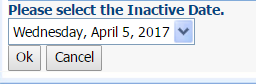
- Select the Inactive Date from the drop-down menu (date must be in the past).
- Select Save.